Coaster Mockups: Elevate Your Brand with Realistic Presentation
When you have a fantastic design for a coaster, whether it's for a client's brewery, a wedding favor, or your own online shop, showing it off in a realistic setting can make all the difference. Flat, static images on a white background rarely capture the texture, weight, and real-world context of a physical product. This is where high-quality Coaster Mockups become an indispensable part of your design toolkit. They bridge the gap between a digital file and a tangible item, allowing you to present your work with the professionalism and impact it deserves.
What Exactly Are Coaster Mockups?
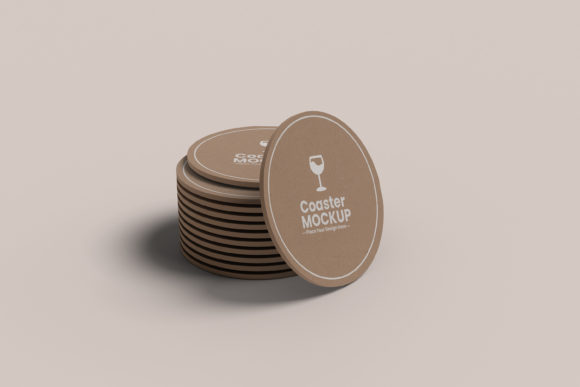
At its core, a coaster mockup is a pre-made, high-resolution template that allows you to digitally place your artwork onto a photorealistic image of a coaster. Think of it as a digital stage for your design. The specific mockups we're discussing are provided as layered PSD files, which means they are built within Adobe Photoshop for maximum control and quality. They aren't just simple overlays; they are carefully crafted scenes that include realistic lighting, shadows, textures, and environments—like a cozy coffee table, a sleek bar top, or a rustic wooden surface. The visual personality of these assets is one of authenticity and versatility. They are designed to look as close to a professional product photograph as possible, giving your portfolio, social media feed, or e-commerce listing an immediate boost in credibility.
Effortless Customization with Smart Objects
The true magic of this particular set of Coaster Mockups lies in its incredibly user-friendly design, centered around the Smart Object feature. For the uninitiated, a Smart Object is a special layer in Photoshop that holds your original design data, allowing you to edit it non-destructively. Here’s how simple it is: you open the PSD file, locate the clearly labeled Smart Object layer (often called "Your Design Here"), and double-click it. This opens a new tab where you paste your coaster artwork. Save that tab, and like magic, your design is perfectly wrapped and blended into the mockup scene, complete with all the right perspective, lighting, and shadow effects. This drag-and-drop simplicity means you can go from a concept to a stunning presentation in under a minute, a huge time-saver for busy designers and entrepreneurs.
Beyond the Design: Full Control Over the Scene
Flexibility is key to making a mockup fit your specific brand aesthetic. These PSD files go beyond just swapping out the artwork. They offer comprehensive control over the entire composition:
- Changeable Background & Shadow Color: You aren't stuck with a single scene. With solid color layers, you can easily recolor the background to match your brand's color palette or create a specific mood. Likewise, the shadow color can be adjusted to ensure it complements both the coaster and the background for a cohesive, natural look.
- Separate Object and Shadow Layers: For advanced users, having the coaster object and its cast shadow on separate layers offers granular control. You can adjust the shadow's opacity, blur, or position independently, allowing for perfect integration into any custom background you might want to add later.
- High-Resolution Fidelity: With a canvas size of 4500×3000 pixels at 300 DPI, these are truly high-resolution assets. This ensures your final output is crystal clear, whether it's for a detailed website zoom-in, a printed lookbook, or large-format social media graphics. There's no worrying about pixelation or blurry edges.
Practical Applications for Designers and Businesses
The utility of a solid coaster mockup extends across numerous projects. For a graphic designer, it's a professional tool for client presentations. Instead of emailing a flat JPEG, you can show the client their logo on a coaster sitting on a bar, instantly helping them visualize the final product. This elevates your service from just creating a file to delivering a brand identity experience.
For entrepreneurs and small business owners, especially those selling on platforms like Etsy or their own Shopify store, these mockups are a game-changer for product photography. Creating consistent, appealing product listings is crucial for conversion. Using the same mockup style across all your coaster designs builds a cohesive and recognizable shop aesthetic. Marketers and content creators can use them to generate engaging social media content—imagine a series of Instagram posts featuring beautifully styled coasters with different quotes or designs, each perfectly tailored to a campaign's color scheme.
Key Features at a Glance
- Format: PSD Mockups for Adobe Photoshop.
- Resolution: High Resolution with 4500×3000px, 300 DPI.
- Core Function: Easy to use with smart object layer for drag-and-drop design placement.
- Customization: Changeable background-color and shadow color via solid color layers.
- Advanced Control: Separate object and shadow layers for precise adjustments.
- Support: PDF Help File Included for quick reference.
Making the Most of Your Mockup Investment
Choosing the right mockup is about more than just finding a pretty picture. Consider the style of the coaster in the template—does it have rounded edges, a cork back, a thick pulpboard texture? Does the environment match the vibe of your design or your client's brand? A rustic, wood-grain background might be perfect for a craft brewery but less suitable for a luxury skincare brand. Always preview the mockup to ensure its inherent style aligns with your project's goals.
Once you have your mockup, test your design at full resolution. Zoom in to check for any alignment issues or artifacts. Play with the background and shadow colors. Sometimes, a subtle shift in the shadow tone from pure black to a dark brown or gray can make the scene feel more natural and integrated. Remember, the goal is to create a believable scenario where your design is the hero. By leveraging the simplicity of the Smart Object and the flexibility of the layered file, you can produce professional-grade visuals that truly resonate with your audience, build brand perception, and ultimately, help sell your creative work more effectively. These design assets are not just about showing a product; they're about telling a story and crafting an experience around your brand identity.